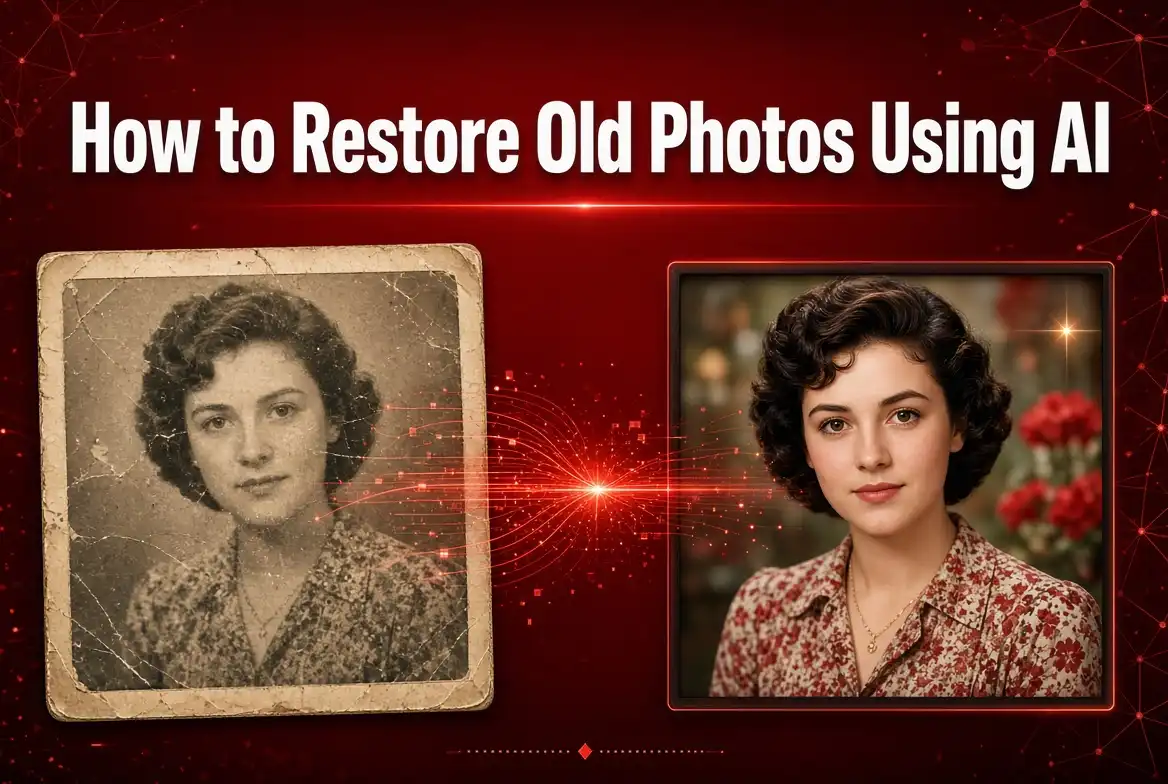
Old photographs are more than pictures. They can preserve family memories, important moments, and pieces of history. Unfortunately, printed photographs can become faded, scratched, blurry, stained, or damaged over time.
Modern AI photo restoration tools can help improve the appearance of old photos by reducing damage, sharpening details, improving contrast, and in some cases adding color to black-and-white images.
What Is AI Photo Restoration?
AI photo restoration is the use of artificial intelligence to improve damaged or low-quality photographs. Instead of manually repairing every scratch or adjusting every part of an image, AI can analyze the photo and automatically apply a variety of enhancements.
Depending on the tool, AI restoration may help with scratches, noise, fading, blur, low resolution, missing details, and color enhancement.
The result depends heavily on the quality and condition of the original image. AI can improve many photographs, but it cannot always perfectly reconstruct details that are completely missing.
What Can AI Do to an Old Photo?
Different AI restoration tools provide different features. Common capabilities include:
- Removing scratches and small imperfections
- Reducing image noise
- Improving sharpness
- Enhancing facial details
- Increasing image resolution
- Improving contrast and brightness
- Reducing the appearance of fading
- Colorizing some black-and-white photographs
- Improving overall image quality
How to Restore an Old Photo Using AI
Step 1: Find the Best Version of Your Photo
Start with the highest-quality version of the photograph you have. If you have the original physical photograph, consider scanning it at a good resolution before uploading it to an AI restoration tool.
Step 2: Upload the Photo
Open an AI-powered photo restoration service and upload your image. Common supported formats include JPG, JPEG, and PNG, although supported formats vary between tools.
Step 3: Select a Restoration Feature
Depending on the service, you may find options for enhancing faces, upscaling, sharpening, removing noise, repairing damage, or colorizing an image.
Step 4: Let AI Process the Image
The AI analyzes the photograph and applies its restoration process. Processing time can depend on the image resolution, file size, and service.
Step 5: Compare the Result
Compare the restored image with the original. Look carefully at faces, eyes, hair, clothing, background details, and other important areas.
Step 6: Make Final Adjustments
If necessary, use additional editing tools to adjust brightness, contrast, color, cropping, or other elements.
How to Restore Scratched Photos With AI
Scratches are one of the most common problems found in old photographs. Small scratches can sometimes be reduced or removed using AI-powered restoration technology.
The AI analyzes surrounding pixels and attempts to reconstruct damaged areas. For simple scratches over relatively uniform backgrounds, the results can be quite useful.
However, a large scratch covering an important facial feature or another complex object may be more difficult to repair accurately.
How to Improve Blurry Old Photos With AI
Many old photographs have lost sharpness because of their age, poor scanning, camera limitations, or physical damage.
AI enhancement tools can sometimes increase perceived sharpness and restore certain facial or image details.
However, sharpening does not magically recover every original detail. When information is completely absent from a blurry image, an AI model may generate a plausible-looking result rather than recover the exact original pixels.
Can AI Colorize Black-and-White Photos?
Yes. Some AI tools can automatically add color to black-and-white photographs. The system analyzes the image and estimates appropriate colors for objects, skin tones, clothing, buildings, landscapes, and other elements.
Colorization can make historical photographs look more vivid, but the colors are generally an AI interpretation rather than a guaranteed representation of the original colors.
How to Restore Old Family Photos
Family photographs can be particularly valuable because they capture people and moments that may no longer exist. Before restoring an important family photo, always keep an untouched copy of the original.
A useful workflow is:
- Scan or photograph the original.
- Save an untouched backup.
- Remove obvious dust or physical debris if necessary.
- Upload a digital copy to an AI restoration tool.
- Enhance the image.
- Review faces and important details carefully.
- Save the restored version separately.
How to Get Better AI Restoration Results
Use a High-Quality Scan
The better the input image, the more useful the restoration process can be. Avoid uploading a heavily compressed screenshot when you have access to a higher-quality scan.
Crop Carefully
If the photograph contains large unnecessary borders, carefully cropping the image can help focus attention on the subject.
Don't Over-Enhance Faces
Some AI tools can make faces look dramatically sharper. Excessive enhancement may create unnatural facial features, so compare the result with the original.
Keep the Original
Never overwrite your only copy. Keep the original scan or photograph so you can return to it if you are unhappy with the AI result.
AI Restoration vs Traditional Photo Editing
Traditional photo editing gives you precise manual control over individual parts of an image. You can use tools such as healing brushes, cloning tools, levels, curves, and color adjustments.
AI restoration is different because it can automate many of these processes and make complex improvements with relatively little manual work.
For severely damaged photographs, combining both approaches can often be more effective: use AI for the initial restoration and traditional editing for final corrections.
Common Problems With AI Photo Restoration
AI Can Invent Details
When details are missing, an AI system may generate information that looks realistic but was not actually present in the original photograph.
Faces Can Change
Facial enhancement can sometimes alter small features. This is particularly important when restoring photographs of family members or historical figures.
Colors May Not Be Accurate
AI colorization estimates colors based on patterns learned from other images. It does not necessarily know the original color of an object.
Severe Damage Can Be Difficult
Photographs with large missing sections, severe tears, extreme blur, or significant physical damage may require manual editing in addition to AI.
Is AI Photo Restoration Free?
Some AI photo restoration tools offer free features, while others use paid plans, credits, or limits on image resolution and processing. Free services can be useful for occasional restoration, while more advanced tools may offer higher-quality processing and additional controls.
Before uploading personal photographs, check the service's privacy policy and understand how your uploaded images are handled.
Is AI Restoration Safe for Important Photos?
AI restoration itself does not damage your original digital file as long as you work on a copy. The more important consideration is where you upload the photograph.
For private family photographs, check whether the service stores uploaded images, how long they are retained, and whether they are used for other purposes.
For especially valuable photographs, maintaining a local high-quality backup is always a good idea.
Ideas for Using Restored Photos
Once an old photograph has been restored, you can use the improved version in many ways:
- Create a family photo album.
- Print an improved copy.
- Create a digital family archive.
- Share memories with relatives.
- Create a photo slideshow.
- Preserve historical photographs.
- Use restored images in family genealogy projects.
- Create before-and-after restoration comparisons.
Frequently Asked Questions
Can AI really restore old damaged photos?
Yes. AI can improve many old photographs by reducing scratches, noise, fading, and blur. The quality of the result depends on the original photograph and the type and severity of damage.
Can AI restore missing parts of a photo?
Some AI systems can generate plausible content for damaged or missing areas. However, generated details should not be assumed to be historically accurate.
Can AI make old photos HD?
AI upscaling can increase image resolution and improve perceived detail. However, increasing resolution does not guarantee that every newly generated detail represents information from the original image.
Can AI restore old family photos?
Yes. AI restoration can be useful for improving family photographs, especially when the original image is faded, scratched, noisy, or low resolution. Always keep an untouched backup of the original.
Can AI colorize old black-and-white photos?
Yes. AI colorization tools can estimate colors and produce a color version of many black-and-white photographs. The resulting colors may not match the original colors exactly.
Conclusion
AI photo restoration provides a convenient way to improve old and damaged photographs. From reducing scratches and noise to enhancing details and colorizing black-and-white images, AI can automate many restoration tasks that once required extensive manual editing.
For the best results, start with the highest-quality image available, keep the original safe, and carefully review the AI-generated result. Remember that AI can estimate missing details, so a restored image should not automatically be treated as an exact reconstruction of the original.
With the right workflow, AI can help turn faded and damaged photographs into cleaner digital copies while preserving the memories captured in them.
Bring Old Photos Back to Life
AI makes photo restoration more accessible than ever. Start with a high-quality copy of your old photograph, experiment with restoration and enhancement features, and compare the result carefully with the original.

Comments (0)
Leave a Comment